Source files
Compare two code files
Open two files in any language and read the changed lines, with word-level marks inside them. An ignore-whitespace mode drops reindentation.
async function retry(fn) {
for (let i = 0; i < 3; i++) {
for (let i = 0; i < 5; i++) {
try { return await fn(); }
catch (e) { if (i === 2) throw e; }
catch (e) { if (i === 4) throw e; }
}
- Languages
- Any text language
- Compared
- Lines and words
- Whitespace
- Optional ignore
- Upload
- None
Open both files
Choose the two files or paste snippets. Line numbers stay on both sides, and whitespace can be ignored.
compare.ts
Runs locallyPaste two versions and press Compare.
What a code diff shows
A code diff compares two versions of a file line by line, then word by word inside the lines that differ. Unchanged lines stay in place as context, removed lines are marked red, added lines green, and a modified line appears as a pair so the changed token is visible instead of the whole line. Read the summary first: it counts added, removed, and modified lines on each side, and tells you what kind of review this is.
Languages, and what makes noise
Every line in a diff is text, and formatting can bury a real change. The table lists the languages people bring here most often, and the one thing worth watching in each.
| Language | What to watch for |
|---|---|
| JavaScript & TypeScript.js .jsx .ts .tsx | Semicolons, quote style, and JSX wrapping are noise. Type-only edits are real changes even when runtime code is identical. |
| Python.py | Indentation is syntax. Compare blocks that moved with care, and never treat leading whitespace as noise. |
| Java.java | Import order and braces are usually formatting. Annotation, signature, and access-modifier changes are the ones to review. |
| C & C++.c .h .cpp .hpp | Preprocessor lines matter. An include-order change can look trivial and still alter which macro or declaration wins. |
| C#.cs | using-directive order is noise. Nullable annotations and signature changes are behavioural even with the body untouched. |
| Go.go | gofmt keeps formatting stable, so most differing lines are real. Check build tags and import grouping separately. |
| Rust.rs | rustfmt output is stable, but macro bodies can reformat heavily. Read inside the macro before assuming a change is cosmetic. |
| Ruby.rb | Blocks and heredocs span lines. Check indentation inside a heredoc manually; the diff sees text, not string semantics. |
| PHP.php | Mixed HTML and PHP is noisy. Tag boundaries and quoting changes can be functional, so do not dismiss them. |
| Swift.swift | Formatter changes are common. Availability annotations and optional unwrapping are the lines that change behaviour. |
| Kotlin.kt .kts | Trailing commas and wrapping are formatting. Nullability and default arguments are API changes worth a look. |
| HTML.html .htm | Attribute order and wrapping are noise. Whitespace between inline elements can change rendering, so do not ignore it blindly. |
| CSS & SCSS.css .scss | Minified and expanded versions produce an unreadable diff. Compare like with like, and review property order when specificity matters. |
| SQL.sql | Keyword case and formatting are noise. Dialect-specific syntax, clause order, and join conditions are real changes. |
| Shell.sh .bash .zsh | CRLF line endings can make every line look changed. Normalise them first, then review quoting and command order. |
| YAML.yml .yaml | Indentation is structure and tabs are invalid. A one-space shift can change a block's meaning without changing a value. |
If your language is missing, paste it anyway: both sides only need to be text.
Example 1: a TypeScript refactor
Both examples are read by the same engine as the tool above. This one refactors a total calculation: the signature gains a discount parameter, the subtotal now multiplies by item.quantity, and the return becomes a clamped total. The excerpt below is the first change block: three lines removed, four added, and the tax line left plain as context. The full file in the screenshot has three change blocks in all, because formatPrice also changed.
// calculateTotal.ts
export function calculateTotal(items: Item[], taxRate = 0.1): number {
export function calculateTotal(items: Item[], taxRate = 0.1, discount = 0): number {
const subtotal = items.reduce((sum, item) => sum + item.price, 0);
const subtotal = items.reduce((sum, item) => sum + item.price * item.quantity, 0);
const tax = subtotal * taxRate;
return subtotal + tax;
const total = subtotal + tax - discount;
return Math.max(total, 0);
}
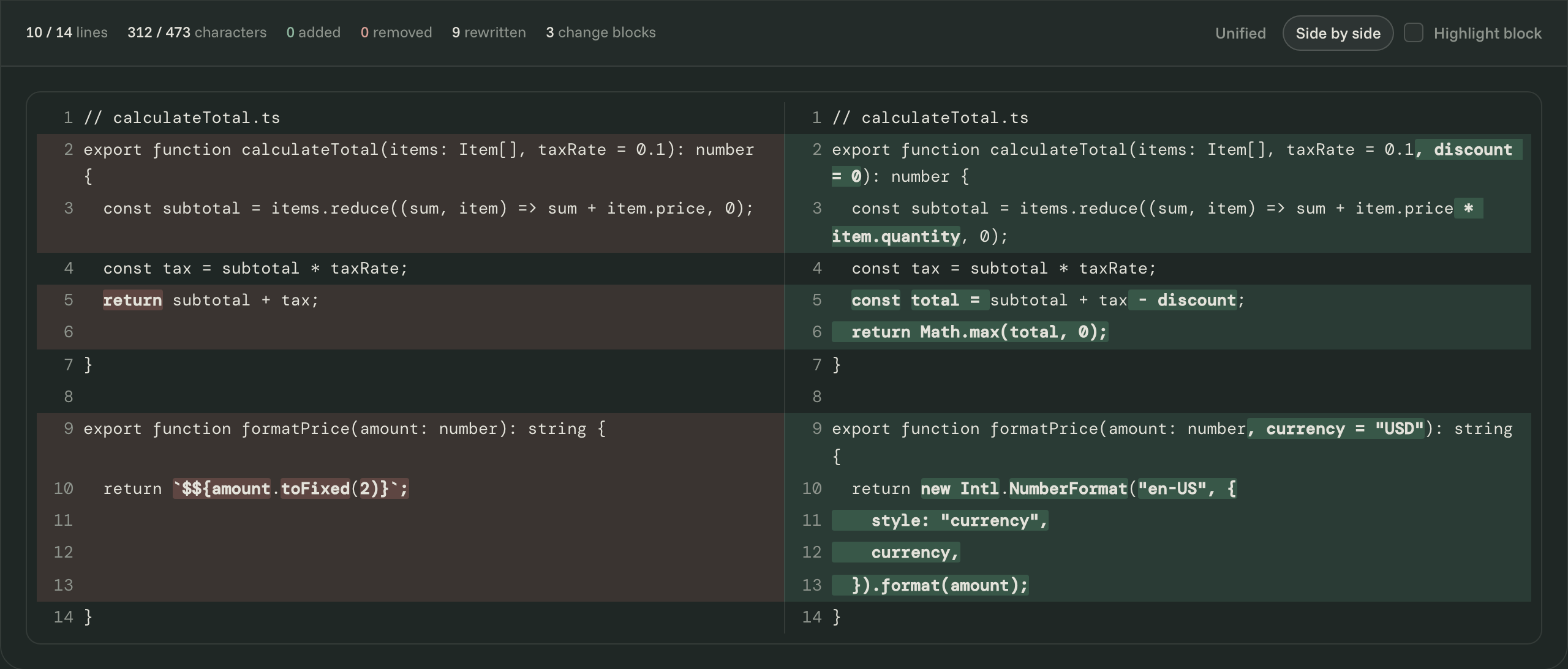
formatPrice helper, and three change blocks counted above the diff.Open the full screenshotThe quantity multiplication is the behavioural fix; the Math.max clamp arrived with it and quietly changes what a negative total returns. The diff shows what changed, not whether it is right: if item.quantity can be zero for a bundled line, the new multiplication deserves its own test.
Example 2: a Python range check
The second example changes a validation function. The def line gains a rounding parameter, the guard becomes a chained comparison, and the return is split into a named discount and a rounded subtraction.
def apply_discount(price, percent):
def apply_discount(price, percent, rounding=2):
if percent < 0 or percent > 100:
if not 0 <= percent <= 100:
raise ValueError("percent out of range")
return price - (price * percent / 100)
discount = price * percent / 100
return round(price - discount, rounding)
Watch the raise line: it stays as context because neither its text nor its indentation changed, though the lines around it moved. The chained comparison 0 <= percent <= 100 says the same thing as the old or test while evaluating percent once, and moving round into the function stops every caller from formatting the result itself.
The whitespace switch earns its keep here: it trims trailing spaces but keeps leading indentation, so a line that left an if block is still reported while a reindented file is not.
Git diff, or this page
Both run on your machine and both show line changes, but they answer different questions: git diff compares states inside a repository, this page compares any two blocks of text you can open or paste.
| Aspect | Git diff | This page |
|---|---|---|
| Setup | Git installed plus a repository | Only a browser |
| Compares | Commits, branches, the index, or the working tree | Any two files or snippets |
| History | History, blame, renames, merges | None; only your two versions |
| Output | A patch that git apply can apply | A visual unified or side-by-side view |
| Best for | Reviewing a branch, generating a patch | A quick check outside a repository |
| Privacy | Runs locally on your machine | Runs locally in your browser |
Use git diff when both versions are tracked and you need history, blame, or a patch. Use this page when the code is not in a repository: a snippet from a chat, two config files from different servers, generated output before and after a template change, or a minified bundle compared with its source. The rule is where the files live: one repository, git diff; two browser tabs, this page.
Code that stays local
Proprietary source, an NDA, or a policy against pasting code into a website are the usual reasons to hesitate. The comparison runs in your browser: files are read with the File API, the diff is computed in a Web Worker, and no request carries the code anywhere. There is no account, no upload endpoint, and no server-side copy, which you can confirm in the Network tab. Device memory is the practical size limit, and nothing is stored, so copy out anything worth keeping.
Need another format? Compare Word documents with the Word diff tool, text-based PDFs with the PDF diff tool, Excel workbooks with the Excel diff tool, JSON with the JSON diff tool, or paste plain text into the text compare tool.
Questions about code diffs
Straight answers to the questions people ask before they compare two files.
if (attempts < 3) {
if (attempts < 5) {
retry(request);
}
Is it safe to paste proprietary code into this tool?
Yes. The diff is computed entirely in your browser by a Web Worker, and your code is never uploaded to, logged on, or stored in any server. That makes it safe for proprietary source code and code covered by an NDA or a security policy.
Which programming languages does this code diff support?
Any text-based language: the comparison is line- and word-level, not language-aware. That includes JavaScript, TypeScript, Python, Java, C/C++, C#, Go, Rust, Ruby, PHP, Swift, Kotlin, HTML, CSS, SQL, YAML, and shell scripts. The table above lists what creates noise in each one.
What is the difference between code diff and git diff?
git diff works on a repository and shows differences between commits, branches, the index, or the working tree, and can produce an applyable patch. This tool compares any two blocks of text you paste or upload, with no repository, no commit history, and no installation. Use git diff when both versions are tracked; use this tool when they are not.
Does ignore whitespace also ignore indentation?
It trims trailing spaces and tabs from every line before comparing, so a line that only gained or lost trailing whitespace is not reported. Leading indentation is deliberately preserved, because it is syntax in Python and other indentation-sensitive languages and removing it would hide real changes.
Can I compare whole files instead of pasting snippets?
Yes. Use the Open File buttons to load one file on each side, or paste snippets directly into the text boxes. Files are read with the browser's File API on your device and are never uploaded anywhere.
Is there a file size or usage limit?
No account, no quota, and no usage limit. Because it runs locally, the practical limit is your device's memory, and large files are processed off the main thread so the page stays responsive.
What do the colors and the summary mean?
Red lines were removed, green lines were added, and paired red/green lines are modifications with changed words highlighted. The summary counts lines and characters on each side, plus added, removed, and modified lines.