JSON data
Compare two JSON documents
Paste or open two JSON files and see which keys and values changed. Key order can be ignored, so a reformat is not reported as a change.
{
"timeout": 30,
"region": "eu-west-1",
"region": "eu-central-1",
"retries": 3
}
- Format
- .json
- Compared
- Keys and values
- Key order
- Optional ignore
- Upload
- None
Paste both documents
Paste into the two panes or open the files. Both documents are checked for valid JSON before the diff runs.
compare.json
Runs locallyPaste two JSON documents and press Compare.
JSON validation vs JSON diff
Validation answers one question: is this document syntactically valid JSON? It catches a trailing comma, a comment, single-quoted strings, an unquoted key, NaN, or a missing closing brace, and it reports where parsing stopped. It says nothing about whether the data is correct for your application; a valid document can still have the wrong shape.
A diff answers a different question: given two documents that both parse, what changed between them? It needs valid input on both sides, because comparing malformed text produces noise. That is why this tool validates each box before diffing: if the left side is missing a comma, the error names the side and the parser message instead of showing a misleading line diff.
Neither technique replaces JSON Schema validation, which checks types, required fields, formats, and ranges. Use all three: validate the syntax, diff the versions, and assert the contract with a schema.
Nested objects, and the path to a change
A JSON object can nest objects and arrays to any depth. A change several levels down is still reported against the full path, which is what makes the result usable: customer.address.zip is a precise location, while "line 9 changed" is not.
Before
{
  "orderId": "A-1042",
  "customer": {
    "name": "Mia Chen",
    "address": { "city": "Austin", "zip": "78701" }
  },
  "status": "pending"
}
After
{
  "orderId": "A-1042",
  "customer": {
    "name": "Mia Chen",
    "address": { "city": "Austin", "zip": "78702" },
    "tier": "gold"
  },
  "status": "paid"
}
Here customer.address.zip changed from 78701 to 78702, customer.tier was added, and status moved from pending to paid. The zip line is a nested value edit and the tier line is a new nested key, which is the distinction a schema cares about. With ignore key order enabled, object keys are sorted at every level before comparing, so a reordered customer or address object does not appear as a change. Arrays are not reordered.
Watch the difference between a missing key and a null value. {"tier": null} means the key exists with no value; an absent tier means the key is not present. A diff shows the line difference, but only your schema knows which form is acceptable. A type change from "1" to 1, or from [] to {}, is also a real change.
Arrays keep their order
Arrays are ordered, and the order is part of the data. Two arrays with the same values in a different order are different JSON documents, so this tool does not sort them, even when ignore key order is on. It compares values by position, which means inserting an item at the front shifts every later item and can look like many changes at once.
Before
{
  "roles": ["admin", "editor"],
  "tags": ["billing", "beta"]
}
After
{
  "roles": ["admin", "viewer"],
  "tags": ["billing", "beta", "eu"]
}
The second role changed from editor to viewer, and a third tag was added. For an array of objects keyed by id, an insertion is harder to read because every following object moves down one position. When order is not meaningful, sort the array on a stable key before comparing; when it is meaningful, keep it and read the added and removed rows together. Ignore key order sorts object keys only. It never sorts arrays or merges them by identity.
Comparing two API responses
The most common use is checking a response body before and after a deployment. Save the payload from the current environment, call the same endpoint on the new build, and compare the two documents. A contract change that breaks a client shows up as a changed key, a removed field, or a new required value, before a user reports it.
Before
{
  "status": "ok",
  "user": { "id": 42, "roles": ["admin", "editor"] },
  "meta": { "page": 1, "perPage": 20, "total": 57 }
}
After
{
  "user": { "roles": ["admin", "viewer"], "id": 42 },
  "status": "ok",
  "meta": { "perPage": 25, "page": 1, "total": 56 },
  "warning": "partial_results"
}
With ignore key order enabled, the result is four changes: the user's second role changed, meta.perPage moved from 20 to 25, meta.total dropped from 57 to 56, and a warning key was added. The reordered keys inside user and meta are not reported. Without the option, those moved lines would appear too, and the real contract changes would be harder to spot.
Remove volatile fields before comparing. Timestamps, request IDs, and pagination cursors differ on every call, so a raw response rarely matches itself. Mask those fields on both sides, and compare the status code and content type separately, because a JSON diff only sees the body.
A real comparison: one company document
The screenshot below is the example shipped with the tool, loaded with one click. Both documents describe the same company. The left version lists two active employees and a New York address; the right sets Bob to inactive, adds Carol, moves the city to Brooklyn, adds a zip code, and replaces createdAt with updatedAt.
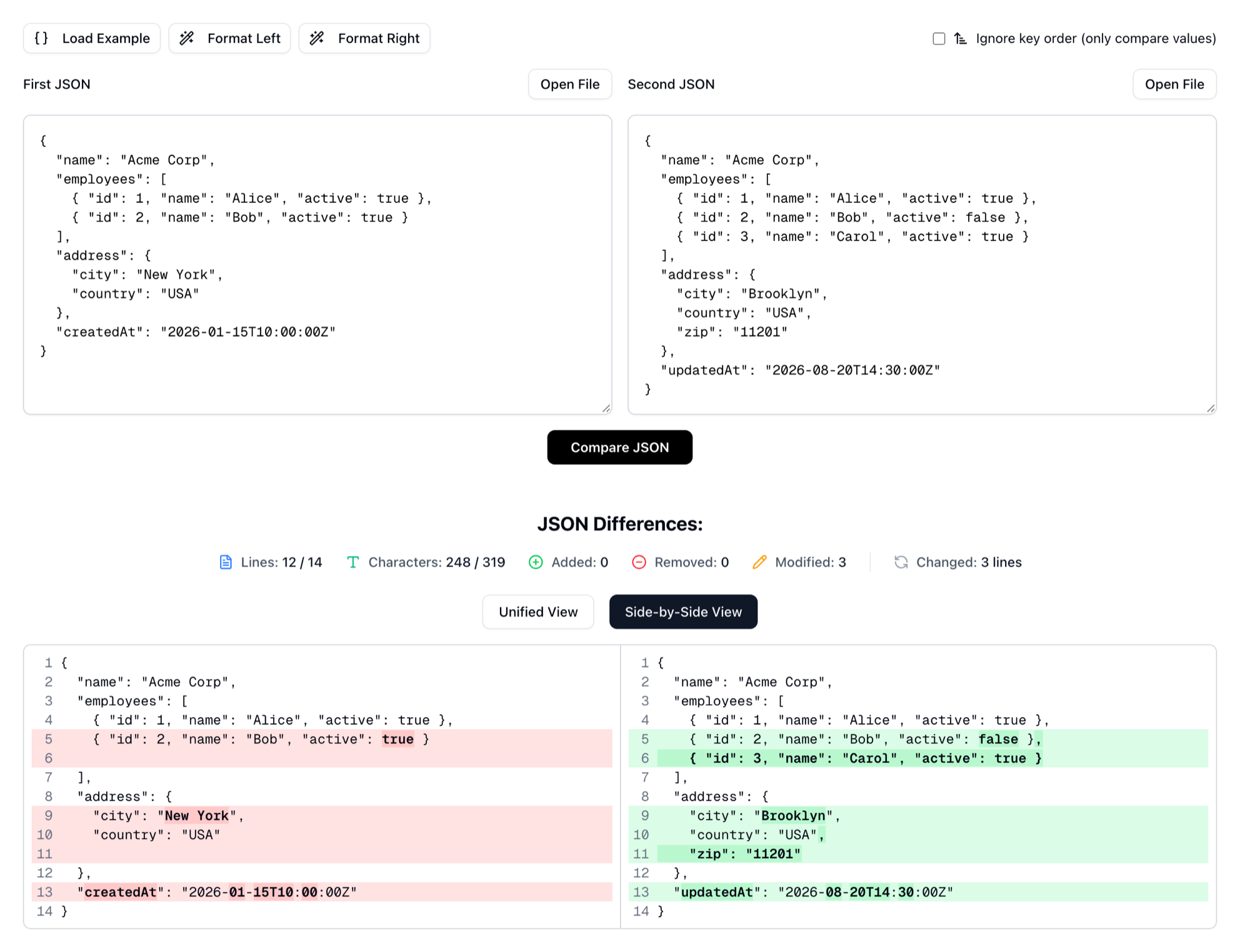
The summary reports three modified lines, and the rows are more granular than the count: Bob's active flag changed, Carol appears only on the right, the city and zip code changed, and createdAt became updatedAt. That is what you want when each value needs review, because unchanged keys stay in place as context.
What a JSON diff cannot tell you
- Array order is data. A reordered array is reported as a change, and this tool does not sort arrays for you.
- Numbers follow JavaScript precision. Re-serializing normalizes 1 and 1.0 to the same value and can round large integers.
- Duplicate keys are not flagged.
JSON.parsekeeps the last occurrence, and re-serializing collapses them. Compare raw text when duplicates matter. - A diff is not a verdict. It shows what changed, not whether the change is intended or valid for your schema.
None of this makes the comparison less useful; it sets the boundary. Read a diff as a precise list of edits, and let a schema, a test, or a reviewer decide whether each edit is acceptable.
Need another format? Compare Word documents with the Word diff tool, text-based PDFs with the PDF diff tool, Excel workbooks with the Excel diff tool, source files with the code diff tool, or paste plain text into the text compare tool.
Questions about JSON data
Straight answers to the questions people ask before they compare two files.
{
"timeout": 30,
"retries": 3,
"retries": 5,
}
Is it safe to compare JSON with this tool?
Yes. The comparison runs entirely in your browser and your JSON is never uploaded, logged, or stored. That makes it safe for confidential API payloads, proprietary schemas, and internal configuration files.
Is comparing JSON as plain text accurate?
Not always. A plain-text comparison reports indentation, trailing whitespace, and key reordering as changes even when the data is identical. This tool validates both documents first, can format them with one click, and can ignore key order, so the diff reflects value changes whatever the serialization format.
What is the difference between JSON validation and JSON diff?
Validation checks whether one document is syntactically valid JSON and points to the parse error. A diff compares two valid documents and lists the keys and values that differ. This tool validates before it compares, so an invalid side produces a clear error message and reports the change that matters.
Can I compare two JSON files with a different key order?
Yes. Enable the ignore key order option and objects are compared by their key-value pairs, whatever order the keys are written in, so a reordered object is not reported as a change. This is useful for comparing API responses where key order is not guaranteed.
Can I compare nested objects and arrays?
Yes. Objects are compared at every nesting level, and array elements are compared by position. Ignore key order sorts object keys recursively but leaves array order untouched, because the order of an array is part of the data so a reformat is not a change.
Does the tool ignore whitespace and formatting changes?
Not automatically. Use Format Left and Format Right to re-indent both documents, or enable ignore key order, which re-serializes each side before comparing. After that, pure indentation differences disappear and only value changes remain.
Can I compare large JSON files or API responses?
Yes. The diff engine runs in a Web Worker off the main thread, so large documents are processed without freezing the page, and files are read on your device and never sent anywhere. The practical limit is your browser's memory; a multi-megabyte response is normally fine.