Word files
Compare two Word documents
Open two .docx files and read the paragraphs that changed, with the rewritten words marked inside each paragraph. The files stay on your machine.
Delivery is due in five working days of signing.
Delivery is due in two working days of signing.
- Format
- .docx
- Compared
- Paragraph text
- Upload
- None
- Cost
- Free
Open both documents
Choose the two .docx files. Paragraphs are aligned, and a rewritten paragraph keeps its unchanged words plain.
compare.docx
Runs locallyChoose two .docx files and press Compare.
What a Word diff compares: paragraphs first, then runs
A .docx file is a package of XML parts, not a flat text file. Word stores the main document as paragraphs, and each paragraph as a sequence of runs. A run is the smallest stretch of text that shares formatting: a bold word, a changed font, or an inserted tracked change starts a new one. Word often splits a sentence into several runs without changing a visible character, so a comparison built on runs reports edits no reader can see.
What Word stores
One sentence can be five runs. Run boundaries follow formatting, spell-check state, and revision marks, not meaning.
What the diff aligns
Paragraphs are matched first. The runs inside each one are joined, and their text is then compared word by word.
That is why this tool rebuilds a paragraph before it compares anything. It walks the paragraph's runs in document order, joins their text, turns non-breaking spaces into spaces and collapses repeated whitespace, then aligns the rebuilt paragraph with its counterpart in the other file. When you compare Word documents here, a reworded clause stays one modified paragraph, a new clause is one addition, and a deleted clause is one removal. The word-level pass then marks only the words that differ inside that paragraph. Run boundaries are gone before the diff starts, so a document that was merely re-saved does not look edited.
Headings, list items, and table-cell text are paragraphs too, so each is its own row. A paragraph that moved is still the same paragraph when its words are unchanged; only the reading order differs. Formatting, images, comments, headers, and footers sit outside the comparison entirely.
Contract clause revisions
A counterparty returns a forty-page services agreement with "minor comments". The changes are spread across payment terms, liability, termination, and data protection, and the other side did not use Track Changes. Reading both versions side by side is slow. A word diff turns the review into a short list: payment moved from thirty days to forty-five, the liability cap from six months to twelve, the termination notice from sixty days to thirty, a non-solicitation clause disappeared, and a data-protection clause appeared. Each item is attached to a paragraph number, so it can go straight into a legal review note. The reviewer still decides whether each change is acceptable; nobody has to hunt for the change first.
Thesis and paper revisions
A supervisor returns a thesis chapter with a new introduction, two reordered sections, and a paragraph rewritten to soften a claim. The author needs to know which requested edits were applied and which paragraphs are new. A paragraph-level diff keeps the reordering visible without pretending that every later line changed. Modified rows show the exact wording that moved; added rows show new material that needs a citation check. It is also a useful self-check before submission: compare the final file with the version sent to the journal and confirm that only the intended changes were made.
Proofreading before publication
Editors, content designers, and operations teams often have a file that passed review and a file that is about to be published. They should be identical except for the approved changes. A final word diff shows whether an unapproved sentence slipped in, whether a disclaimer was removed, or whether a date was updated in one place but not another. The same check works for HR policies, product documentation, grant applications, and internal procedures. It takes less time than reading the document again, and it produces a reviewable list instead of a vague sense that "it looks right".
A real comparison: a services agreement
The screenshot below shows the result when you compare Word documents in the browser. Both files contain ten non-empty paragraphs. The tool reports five modified paragraphs, one removed, one added, and four unchanged - seven changes in total. The service description gained "support and maintenance", payment moved from thirty to forty-five days, the liability cap from six to twelve months, the termination notice from sixty to thirty days, and late-payment interest rose from 1.5% to 2%. The non-solicitation clause was removed and a data-protection clause was added.
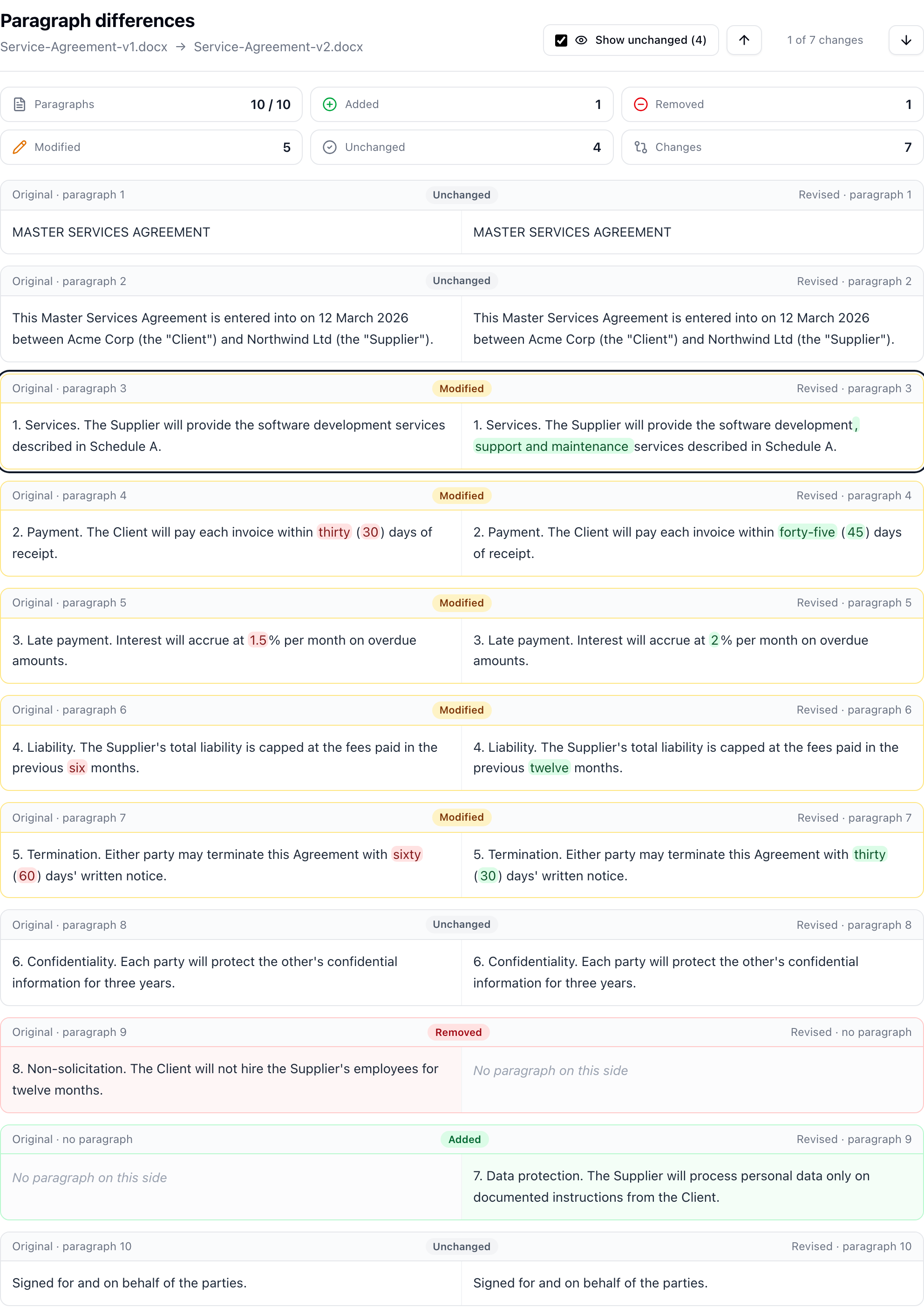
Because the removed and added clauses are not similar enough to be one rewrite, the tool lists them as separate rows instead of pairing them as a modified paragraph. A plain-text diff would have shown them as one large block and made the renumbered headings look unstable. Paragraph alignment keeps each change in its own row, so the summary stays short enough to review and precise enough to act on.
Clean Word comparisons and hard limits
To compare Word documents cleanly, finalise tracked changes first. Unaccepted insertions and deletions change the text Word stores, so a paragraph can differ from what is on screen. Save both sides as .docx, use real paragraphs instead of manual line breaks, and keep the same format on both sides.
- Track Changes answers a different question. It records who edited what and when. A word diff compares the final saved text of any two files, even with unrelated histories; it tells you what changed and where, not who changed it.
- Protected and legacy files need a copy. Remove the password or save an unprotected copy; for an old .doc, use Save As to create a .docx.
- Read the summary before every row. Added, removed, and modified counts tell you what kind of review you are facing, and hiding unchanged paragraphs makes the final pass faster.
Need another format? Compare text-based PDFs with the PDF diff tool, Excel workbooks with the Excel diff tool, JSON with the JSON diff tool, source files with the code diff tool, or paste plain text into the text compare tool.
Questions about Word files
Straight answers to the questions people ask before they compare two files.
Delivery is due in five working days.
Delivery is due in two working days.
What is a word diff?
A word diff is a comparison that shows which words and paragraphs changed between two versions of a document. This tool performs a word diff on .docx files: it aligns paragraphs, labels additions, removals, and rewrites, and highlights the individual words that differ inside a modified paragraph.
Can I compare two Word documents if I only have the .docx files?
Yes. You do not need the original file, a shared drive, or the other person's copy of Word. Select the two .docx files here and the comparison is built from the paragraph text stored inside each file. Nothing is uploaded, and neither document is modified.
Does this tool compare formatting, comments, or tracked changes?
It compares paragraph text, not visual formatting. Bold, italics, fonts, colours, spacing, page layout, images, comments, headers, and footers are not part of the diff. Unaccepted tracked changes are read as Word stores them: inserted text is included and deleted text is ignored, so accept or reject changes first if you want a predictable comparison.
Is my Word document uploaded to a server?
No. Your .docx file is opened and unpacked in your browser, and the paragraph diff is computed on your device. The file is never uploaded, logged, or stored. You can confirm this by opening your browser's Network tab and comparing two documents: no request carrying the document content is sent.
What is the difference between comparing Word documents and comparing plain text?
A plain-text comparison treats the document as one long stream, so a single inserted sentence can shift every following line and make an entire page look changed. A Word document comparison works paragraph by paragraph, so one rewritten clause stays one changed paragraph instead of cascading through the rest of the document.
Can I compare password-protected .docx files?
No. A password-protected .docx file is encrypted, so its paragraph text cannot be read without the password. Open the document in Word, remove the password or save an unprotected copy, and compare that copy here.
Does this tool open old .doc files?
No. It reads .docx files, the format used by Microsoft Word 2007 and later, Word for Microsoft 365, Google Docs exports, and most other modern word processors. For an old .doc file, open it in Word and use File > Save As to save it as .docx, then compare the new copy.
Is there a file size limit or a sign-up requirement?
There is no account, no sign-up, and no server-side quota. Because the whole comparison runs in your browser, the practical limit is your device's available memory and the speed of your browser. Very large documents may take a moment to unpack, but they are not uploaded or queued on a server.